However, back at the beginning of 2010, Nokia made the move to offer its Ovi Maps and route guidance system up for all to use - all who use the right bunch of Nokia phones, that is. Here's a quick guide as to why that's a more interesting proposition than some might have realised - both those happy to pay for TomTom, Mio Navman and Garmin and those who're singing the praises of Google Maps.

Kamis, 17 Februari 2011
The 10 point guide to Nokia's Ovi Maps
With the Nokia smartphones less inspiring than the current darlings of the mobile industry HTC, Apple and BlackBerry as well as the irresistible forces that are Samsung and LG, it's easy to dismiss what the Finnish company has to offer at the top end.
However, back at the beginning of 2010, Nokia made the move to offer its Ovi Maps and route guidance system up for all to use - all who use the right bunch of Nokia phones, that is. Here's a quick guide as to why that's a more interesting proposition than some might have realised - both those happy to pay for TomTom, Mio Navman and Garmin and those who're singing the praises of Google Maps.
However, back at the beginning of 2010, Nokia made the move to offer its Ovi Maps and route guidance system up for all to use - all who use the right bunch of Nokia phones, that is. Here's a quick guide as to why that's a more interesting proposition than some might have realised - both those happy to pay for TomTom, Mio Navman and Garmin and those who're singing the praises of Google Maps.

Rabu, 16 Februari 2011
How to Download Nokia Apps and Games from Ovi Store to Computer
Ovi Store is a great place for Nokia users to find and download applications, games, themes, videos and sounds. However, typically one must use a compatible phone or Ovi Suite. This tutorial describes how to download from Ovi Store directly to your computer from your browser. Detailed instructions are given for finding the direct links to the .jad files and on how to convert sis.dm files to .sis files.
Update: With the new Ovi Store update, some models may not work with method 1. Please try method 2.
Method 1:
This requires using firefox as the browser. You will also need a Nokia user account which is typically the account you would use on your phone.
1. Install User Agent Switcher add-on and restart your Firefox.
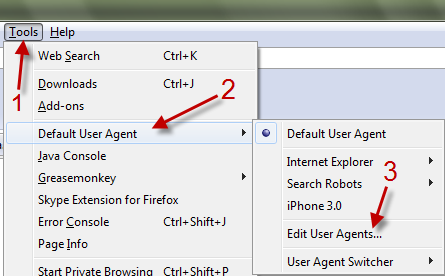
2. Go to Tools->Default User Agent->Edit User Agent.
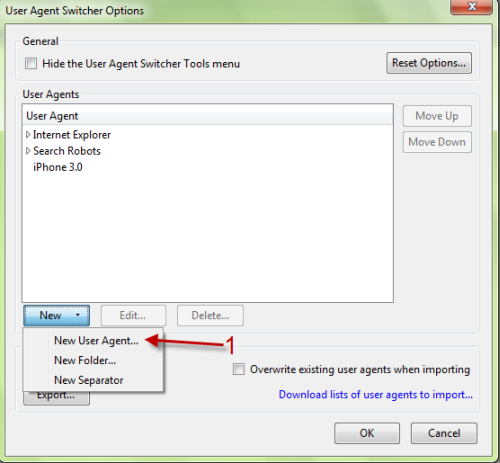
3. In User Agent Switcher Options window, choose New->New User Agent…..
How to Download Nokia Ovi Store Applications to Computer via Firefox
Nokia, just like Android has a magnificent number of application in their application store named Nokia Ovi Store. The application database is superb and one will find one or the other application to suit his needs. One thing annoying with the app store in that you can not download the apps on your PC and later transfer it to your phone. People who are not connected through GPRS or 3G find it real pain to install the apps. Now here is a way you can download the apps directly to your system and transfer them to your mobile at a later stage.
Note :: I have used Firefox and Windows OS for the trick and to be frank I don’t know how to do it on other browser and Operating Systems so please install Firefox before you proceed on a Windows running system
Note :: I have used Firefox and Windows OS for the trick and to be frank I don’t know how to do it on other browser and Operating Systems so please install Firefox before you proceed on a Windows running system
Guide to download Nokia Ovi store application to PC:
- Download a small Firefox add-on User Agent Switcher and restart your browser for the changes to take effect.
- Now Open any suitable editor and copy the code given below.
<useragentswitcher><useragent description="Internet Explorer 7 (Windows Vista)" useragent="Mozilla/4.0 (compatible; MSIE 7.0; Windows NT 6.0)" appcodename="" appname="Microsoft Internet Explorer" appversion="4.0 (compatible; MSIE 7.0; Windows NT 6.0)" platform="Win32" vendor="" vendorsub=""/><useragent description="Netscape 4.8 (Windows Vista)" useragent="Mozilla/4.8 [en] (Windows NT 6.0; U)" appcodename="" appname="Netscape" appversion="4.8 [en] (Windows NT 6.0; U)" platform="Win32" vendor="" vendorsub=""/><useragent description="Opera 9.25 (Windows Vista)" useragent="Opera/9.25 (Windows NT 6.0; U; en)" appcodename="" appname="Opera" appversion="9.25 (Windows NT 6.0; U; en)" platform="Win32" vendor="" vendorsub=""/><useragent description="Nokia 5800" useragent="Mozilla/5.0 (SymbianOS/9.4; U;Series60/5.0 Nokia5800/10.0.006;Profile/MIDP-2.1 Configuration/CLDC-1.1) AppleWebKit/413 (KHTML, like Gecko) Safari/413" appcodename="" appname="" appversion="" platform="" vendor="" vendorsub=""/><useragent description="N95" useragent="Mozilla/5.0(SymbianOS/9.2; U;Series60/3.1 NokiaN95/1.39.044; Profile/MIDP-2.0 Configuration/CLDC-1.1;)AppleWebKit/413(KHTML,like Gecko)Safari/413" appcodename="" appname="" appversion="" platform="" vendor="" vendorsub=""/><useragent description="5310" useragent="Nokia5310XpressMusic/1.0 Profile/MIDP-2.1 Configuration/CLDC-1.1" appcodename="" appname="" appversion="" platform="" vendor="" vendorsub=""/><useragent description="E71" useragent="Mozilla/5.0 (SymbianOS/9.2; U; Series60/3.1 NokiaE71-3/1.00.000; Profile/MIDP-2.0 Configuration/CLDC-1.1;)AppleWebKit/413(KHTML, like Gecko) Safari/413" appcodename="" appname="" appversion="" platform="" vendor="" vendorsub=""/><useragent description="N97" useragent="Mozilla/5.0 (SymbianOS/9.4; U; Series60/5.0 NokiaN97/10.0.001; Profile/MIDP-2.1 Configuration/CLDC-1.1) AppleWebKit/525 (KHTML, like Gecko) Safari/525" appcodename="" appname="" appversion="" platform="" vendor="" vendorsub=""/></useragentswitcher>
Langganan:
Komentar (Atom)