Selasa, 01 Maret 2011

If U Like Angry Birds, U May Like This!

Demo Crazy Penguin Catapult 2

Size - 0.42 MB
The Polar bears have landed – for a Southern Invasion! Fend them off in up to 60 levels of hilarious fun by hurtling courageous penguins at them with your trusty catapult! Enjoy twice the wacky action of Crazy Penguin Catapult - including all new bonus rounds & boss battles! Complete missions perfectly for special penguin upgrades and play strategy or campaign modes for endless fun! By Digital Chocolate.

You May Try This At Home!

Pull My Finger

Size - 2.36 MB
What will happen when you pull my finger? Download this fun application and find out. New version now also supports a timer function so you can fool your friends. Find out more and get your FREE copy now!

Vuvuzela, Air Horn & More

Size - 1.62 MB
Supporter FX: Vuvuzela, Air Horn & More It ’s time to turn your mobile into your favorite supporter sound-box. Sports fans around the world regardless of their favorite sport are using this app to unleash their own interactive Vuvuzela, Air Horn, Drum, or Whistle. Now watch soccer or any other sport knowing you can blast your vuvuzela usi ng your Nokia phone. What is your favorite: Vuvuzela, Air Horn, Drums, or the Whistle? Go beyond the vuvuzela and get your FREE copy now!

Some Applications You Might Know..

Lite - FindMe

Size - 0.49 MB
Worried about losing your phone?If your phone is stolen & a new SIM is inserted into your phone,'FindMe' sends SMS silently from thief's phone to a buddy phone number.Track thief on Google map.Get features like remote lock,auto lock,loud siren & uninstall prevention by thief.Upon detecting new SIM inside phone,'FindMe' plays loud siren,which helps you to find culprit in crowded place.Operate 'FindMe' remotely through SMS commands.watch demo video on http://www.youtube.com/watch?v=tLtdetXH4uo

Blacklist Mobile Lite


Size - 0.15 MB
Does someone annoy you with unwanted calls and messages? Use Blacklist Mobile Lite to reject all incoming calls as well as SMS/MMS from this person. This app allows you to add one particular contact to blacklist for free. No time limits, no charges, but just one contact. Consider using full version of Blacklist Mobile if you want to block as many contacts as you want + reject unknown/hidden numbers. Please contact us if you have any questions, suggestions or download problems: admin@dtarasov.ru

Kamis, 17 Februari 2011

The 10 point guide to Nokia's Ovi Maps

With the Nokia smartphones less inspiring than the current darlings of the mobile industry HTC, Apple and BlackBerry as well as the irresistible forces that are Samsung and LG, it's easy to dismiss what the Finnish company has to offer at the top end.
However, back at the beginning of 2010, Nokia made the move to offer its Ovi Maps and route guidance system up for all to use - all who use the right bunch of Nokia phones, that is. Here's a quick guide as to why that's a more interesting proposition than some might have realised - both those happy to pay for TomTom, Mio Navman and Garmin and those who're singing the praises of Google Maps.

1) It works offline

One of the major complaints with a lot of the satnavs on mobile phone systems is that as soon as you go into the countryside and start losing reception, the whole thing comes crashing down. Ovi Maps doesn't suffer from that problem. The reason is that the application downloads the full map information to your handset rather than constantly having to refer and access the map data in the cloud. So, not only does it require no internet connection to get you from A to B, but it also won't cost you a penny in data as well. If you do choose to run the app in online mode, you get access to a few more features and it might be a smidge quicker with assisted GPS, but otherwise it's the same kettle of fish.

2) It's for pedestrians and motorists

Like TomTom on the iPhone or Google Maps for Navigation, one of the good things about Ovi Maps is that it runs on your mobile phone. When you add that in with the fact that it gives route guidance for both pedestrians and motorists, then it means you only have to bother with one device on you at any one time. Certainly beats bulking out an extra pocket with a big-screened dedicated satnav as well as your handset.


Rabu, 16 Februari 2011

How to Download Nokia Apps and Games from Ovi Store to Computer

Ovi Store is a great place for Nokia users to find and download applications, games, themes, videos and sounds. However, typically one must use a compatible phone or Ovi Suite. This tutorial describes how to download from Ovi Store directly to your computer from your browser. Detailed instructions are given for finding the direct links to the .jad files and on how to convert sis.dm files to .sis files.


Update: With the new Ovi Store update, some models may not work with method 1. Please try method 2.
Method 1:
This requires using firefox as the browser. You will also need a Nokia user account which is typically the account you would use on your phone.
1. Install User Agent Switcher add-on and restart your Firefox.
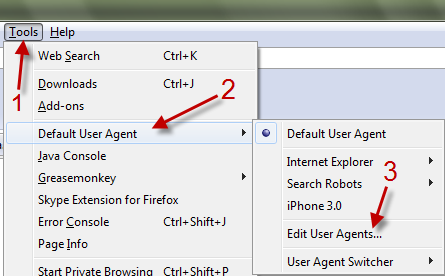
2. Go to Tools->Default User Agent->Edit User Agent.

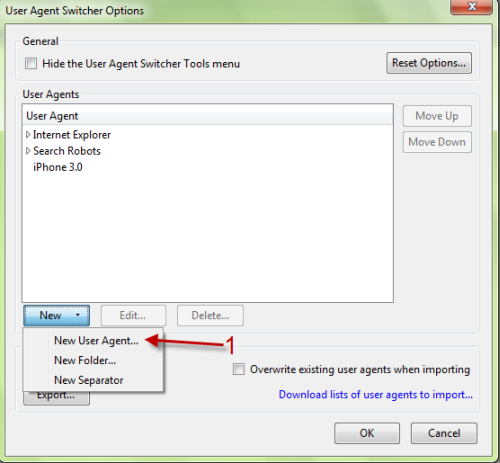
3. In User Agent Switcher Options window, choose New->New User Agent…..


How to Download Nokia Ovi Store Applications to Computer via Firefox

Nokia, just like Android has a magnificent number of application in their application store named  Nokia Ovi Store. The application database is superb and one will find one or the other application to suit his needs. One thing annoying with the app store in that you can not download the apps on your PC and later transfer it to your phone. People who are not connected through GPRS or 3G find it real pain to install the apps. Now here is a way you can download the apps directly to your system and transfer them to your mobile at a later stage.
Note :: I have used Firefox and Windows OS  for the trick and to be frank I don’t know how to do it on other browser and Operating Systems so please install Firefox before you proceed on a Windows running  system

Guide to download Nokia Ovi store application to PC:

  • Download a small Firefox add-on User Agent Switcher and restart  your browser for the changes to take effect.
  • Now Open any suitable editor and copy the code given below.
<useragentswitcher><useragent description="Internet Explorer 7 (Windows Vista)" useragent="Mozilla/4.0 (compatible; MSIE 7.0; Windows NT 6.0)" appcodename="" appname="Microsoft Internet Explorer" appversion="4.0 (compatible; MSIE 7.0; Windows NT 6.0)" platform="Win32" vendor="" vendorsub=""/><useragent description="Netscape 4.8 (Windows Vista)" useragent="Mozilla/4.8 [en] (Windows NT 6.0; U)" appcodename="" appname="Netscape" appversion="4.8 [en] (Windows NT 6.0; U)" platform="Win32" vendor="" vendorsub=""/><useragent description="Opera 9.25 (Windows Vista)" useragent="Opera/9.25 (Windows NT 6.0; U; en)" appcodename="" appname="Opera" appversion="9.25 (Windows NT 6.0; U; en)" platform="Win32" vendor="" vendorsub=""/><useragent description="Nokia 5800" useragent="Mozilla/5.0 (SymbianOS/9.4; U;Series60/5.0 Nokia5800/10.0.006;Profile/MIDP-2.1 Configuration/CLDC-1.1) AppleWebKit/413 (KHTML, like Gecko) Safari/413" appcodename="" appname="" appversion="" platform="" vendor="" vendorsub=""/><useragent description="N95" useragent="Mozilla/5.0(SymbianOS/9.2; U;Series60/3.1 NokiaN95/1.39.044; Profile/MIDP-2.0 Configuration/CLDC-1.1;)AppleWebKit/413(KHTML,like Gecko)Safari/413" appcodename="" appname="" appversion="" platform="" vendor="" vendorsub=""/><useragent description="5310" useragent="Nokia5310XpressMusic/1.0 Profile/MIDP-2.1 Configuration/CLDC-1.1" appcodename="" appname="" appversion="" platform="" vendor="" vendorsub=""/><useragent description="E71" useragent="Mozilla/5.0 (SymbianOS/9.2; U; Series60/3.1 NokiaE71-3/1.00.000; Profile/MIDP-2.0 Configuration/CLDC-1.1;)AppleWebKit/413(KHTML, like Gecko) Safari/413" appcodename="" appname="" appversion="" platform="" vendor="" vendorsub=""/><useragent description="N97" useragent="Mozilla/5.0 (SymbianOS/9.4; U; Series60/5.0 NokiaN97/10.0.001; Profile/MIDP-2.1 Configuration/CLDC-1.1) AppleWebKit/525 (KHTML, like Gecko) Safari/525" appcodename="" appname="" appversion="" platform="" vendor="" vendorsub=""/></useragentswitcher>